What is Automated Invoicing?

Written by Arnon Shimoni
✓ Expert
Last updated on:
Automated invoicing is the generation, numbering, tax treatment, delivery and correction of invoices by software, directly from subscription and usage data, without a person assembling each one. The input is what the customer bought and used. The output is a legally valid invoice in the customer's inbox, their e-invoicing network and your ledger, on the day it's due.
The word "automated" undersells it. The hard part isn't producing a PDF on a schedule. It's producing the right invoice, for the right legal entity, with the right tax wording, in the right format for that country, on the right date, with a number that follows the last one, and never having to edit it afterwards.
At a glance | Automated invoicing |
|---|---|
Input | Subscriptions, pricing plans, metered usage events, one-off charges, credits |
Trigger | End of the billing period, a milestone, a payment, or an API call |
Output | A compliant invoice: PDF, structured e-invoice, API object, ledger entry |
Lifecycle | Open → Draft → Final, with corrections by credit note after Final |
Replaces | Spreadsheets, manual ERP entry, month-end invoice runs, hand-edited templates |
Why now | Usage-based pricing, multi-country expansion and e-invoicing mandates make manual invoicing impossible, not just slow |
What gets automated
Rating. Turning what happened into what it costs: applying the customer's plan to their usage, tiers, minimum commits, overages, discounts and credits. This is where most invoice disputes originate, so it's where accuracy matters most.
Aggregation. Combining a platform fee, several usage lines, a prorated upgrade and a credit from last month into one summary invoice per customer per period, as Article 223 of the VAT Directive allows.
Tax. Determining the treatment per invoice from the billing entity's country, the customer's country, the customer's validated VAT status and the product's tax category, then adding the rate or the reverse charge and exemption wording.
Numbering and dating. Assigning a unique sequential invoice number per legal entity at finalisation, and an invoice date by rule, so the sequence stays chronological and the deadline is met.
Formatting and delivery. Rendering the PDF with the entity's branding, generating the structured e-invoice where mandated, sending by email, API, customer portal or e-invoicing network, and tracking delivery and acceptance status.
Collection. Charging a stored payment method, or presenting payment options and chasing with dunning when the due date passes.
Corrections. Applying late usage and adjustments to the draft before it finalises, and issuing linked credit notes and refunds after.
Accounting. Posting invoices, credit notes and payments to the ERP and the revenue recognition schedule.
The invoice lifecycle
Automation only works if the invoice has clear states and rules for moving between them.
Open. The billing period is running. Usage events and charges accrue to the invoice as they happen. The customer can see a running total but nothing is final.
Draft. The period has ended. A grace period lets late events arrive and lets finance review and adjust the invoices that need it. Nothing is numbered yet.
Final. The invoice is numbered, dated, rendered, sent and posted. It can't change. Any correction from here is a credit note.
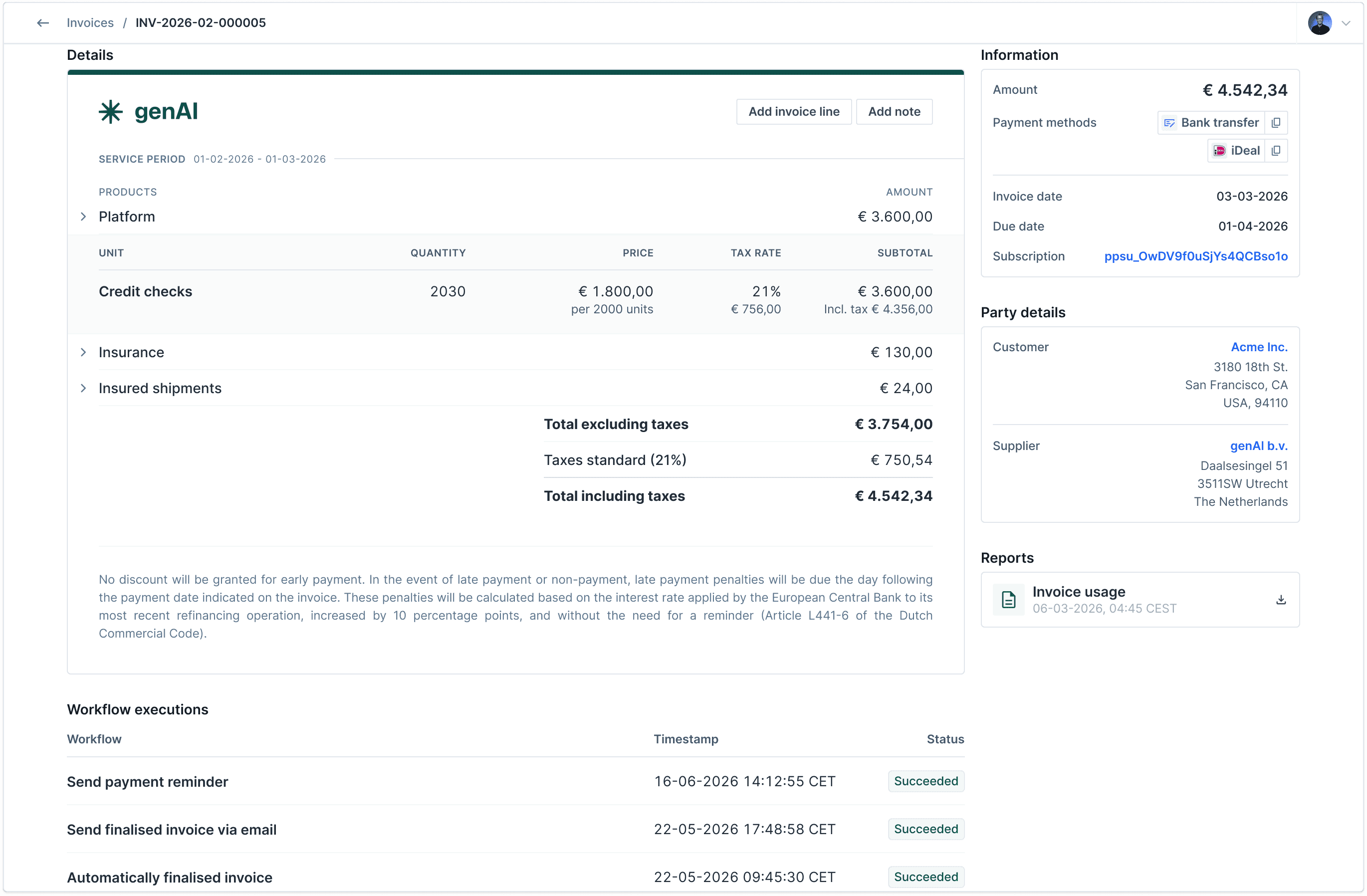
A finalised invoice with its workflow executions: automatically finalised, sent by email, payment reminder. Nobody touched it.
Two refinements make the lifecycle work in practice. A hold flag stops a specific invoice from finalising automatically when someone needs to look at it, without delaying the other 9,999. And an empty state handles periods with no charges, so a customer who used nothing doesn't get a €0 invoice with a number in your sequence.
Why it matters more than it used to
Usage-based pricing. A seat-based invoice can be typed. A metered invoice with per-request, per-GB and per-token lines, tiered rates and a minimum commit can't. The invoice is a computation, and computations are what software is for.
Multi-country, multi-entity. Every country adds a tax regime, a set of mandatory invoice fields, a deadline, a storage period and, increasingly, an e-invoicing format and network. Every legal entity adds a VAT number, a number series, bank details and a template. The combinations grow multiplicatively and manual processes don't.
E-invoicing mandates. Italy, Belgium, Poland, Romania and Hungary already require structured B2B e-invoices. Germany requires issuing from 2027, France phases in from September 2026, and from July 2030 every intra-EU B2B invoice must be a structured e-invoice issued within 10 days and reported in near real time. A human-reviewed month-end invoice run doesn't fit inside a 10-day deadline. The invoice has to be right when it's generated.
Cash. Invoices that go out late, or go out wrong and bounce, are paid late. For a business with net-30 terms, a week's delay in invoicing is a week of working capital.
What to look for
Real-time rating, so the open invoice is always current and there's no batch at period end that can fail.
Tax computed per invoice, not stored as a flag on the customer, with VIES validation.
Immutable final invoices and first-class credit notes with partial crediting by line.
One number series per legal entity, assigned at finalisation, configurable format.
Native structured e-invoicing for the countries you sell in, with submission status on the invoice.
A hold mechanism for exceptions, so review is possible without becoming the bottleneck.
API-first, so invoices can be fetched and shown in your own product and pushed to your ERP.
Where Solvimon fits
Solvimon generates invoices automatically from subscriptions and metered usage. Invoices sit in OPEN during the period, move to DRAFT two hours after it ends and FINAL eight hours later, with an on-hold flag for the ones that need a look. Tax is computed per invoice with VIES validation and automatic reverse-charge notes, each billing entity has its own number series, the invoice date follows a rule you choose, finalised invoices are immutable with credit notes and referenced refunds as the correction path, and structured e-invoices go out through country mandates or Avalara. Invoices are available over the API and in Desk, so you can show them in your own product or send them when you're ready. See the automated invoicing product page, or talk to one of our experts.
FAQ
Isn't automated invoicing just scheduled PDFs?
Scheduling is the easy part. The value is in rating usage correctly, computing tax per invoice, numbering and dating by rule, producing structured e-invoices where required, and handling corrections without editing issued documents.
Can finance still review invoices before they go out?
Yes, for the ones that need it. A draft state with a grace period and a hold flag lets you review exceptions without holding up everything else.
What happens when usage arrives after the invoice is sent?
If the invoice is still in draft, it lands on the invoice. If it's final, it goes on the next invoice or, if it changes what was already billed, on a credit note or debit note.
Does automated invoicing handle e-invoicing mandates?
It has to. In Italy, Belgium, Poland, Hungary and Romania today, and in Germany, France and across the EU for intra-EU trade by 2030, an invoice that isn't a structured e-invoice isn't an invoice.
How does it connect to my ERP?
Invoices, credit notes and payments are posted to the ERP as they finalise, by integration or API. The billing system owns the invoice; the ERP owns the ledger.
This page was last reviewed in October 2026.
Related
EU invoice requirements. What the automated invoice has to contain.
Invoice compliance. Compliance as a system property.
Billing engine. The system that does the rating.
Usage metering. Where the invoice lines come from.
E-invoicing. The structured formats and networks.
Credit note. Correcting a finalised invoice.
Ready for billing v2?
Solvimon is monetization infrastructure for companies that have outgrown billing v1. One system, entire lifecycle, built by the team that did this at Adyen.